

You have a stunning WordPress website that showcases your brand and attracts visitors like bees to honey. But have you ever considered turning it into a powerful ecommerce store? Imagine the possibilities of selling your products and services directly from your website, reaching a global audience, and boosting your revenue. In this article, we will show you how to transform your WordPress website into a thriving ecommerce store using the popular WooCommerce plugin. So buckle up and get ready to take your website to the next level!

Benefits of turning your WordPress website into an ecommerce store
There are numerous benefits to turning your WordPress website into an ecommerce store. First, you gain complete control over your online sales channel. Instead of relying on third-party platforms that charge hefty fees and limit your customization options, you can build a unique and branded store that reflects your business values.
Tip: You will still have the ability to connect your WooCommerce store to third-party marketplaces, such as Amazon, eBay, Etsy, Walmart, etc., if you would like by using WooCommerce extensions.
Second, by selling directly from your website, you eliminate the need for customers to navigate through multiple platforms, improving their shopping experience and increasing conversion rates. With a seamless checkout process and integrated payment gateways, customers can make purchases with just a few clicks.
Last, having an ecommerce store on your WordPress website allows you to tap into the power of content marketing. By regularly publishing high-quality blog posts and product updates, you can attract organic traffic from search engines and engage with your audience, ultimately driving more sales.
How to install and set up WooCommerce on your WordPress website
Now that you understand the benefits of having an ecommerce store, it’s time to get down to business and set it up. The first step is to install the WooCommerce plugin on your WordPress website. Here’s how:
Step 1: Log in to your WordPress dashboard.
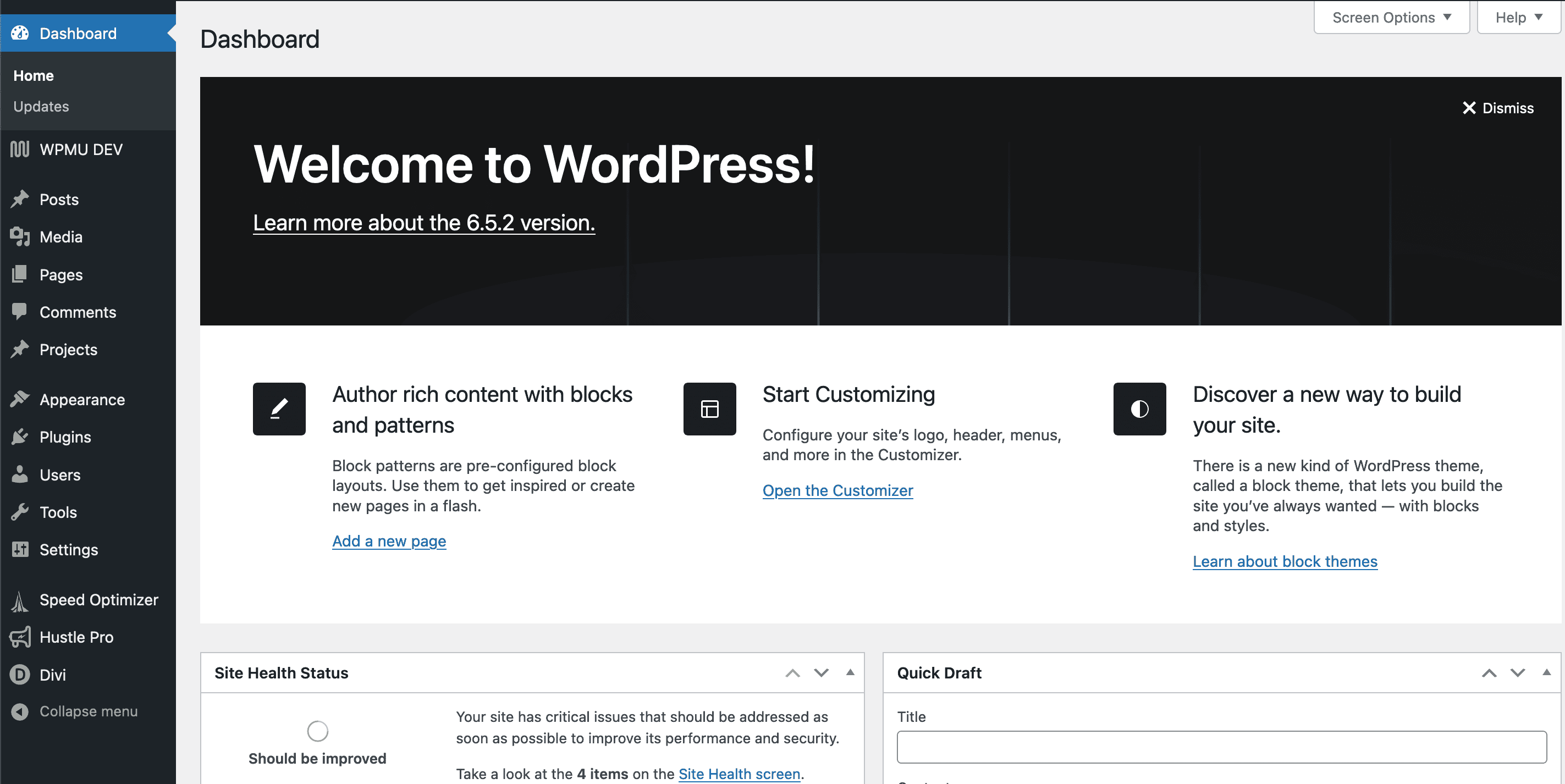
Step 2: Navigate to the “Plugins” section and click on “Add New.”

Step 3: Search for “WooCommerce” in the search bar.

Step 4: Click on the “Install Now” button next to the WooCommerce plugin.

Step 5: Once the installation is complete, click on the “Activate” button to activate the plugin.

Congratulations! You now have WooCommerce installed on your WordPress website. But the setup process doesn’t end here. You need to configure a few essential settings to ensure your ecommerce store functions smoothly. Head over to the WooCommerce settings page and follow the on-screen instructions to set up your store’s basic information, tax settings, shipping options, and more.
Choosing the right theme for your ecommerce store
Now that you have WooCommerce up and running, it’s time to give your ecommerce store a visually appealing and professional look. Your theme choice plays a crucial role in creating a positive user experience and building trust with your customers. Here are a few factors to consider when selecting a theme for your ecommerce store:
Responsiveness: Make sure the theme is mobile-friendly and adapts well to different screen sizes. With the majority of online purchases happening on mobile devices, a responsive theme is essential.
Customizability: Look for a theme that offers plenty of customization options. You want to be able to personalize your store to align with your brand identity and stand out from the crowd.
Compatibility: Ensure that the theme is compatible with the latest version of WooCommerce and other essential plugins you plan to use. This will prevent any compatibility issues and ensure smooth functionality.
Speed and Performance: A slow-loading website can turn away potential customers. Choose a theme that is optimized for speed and performance to provide a seamless browsing experience.
Tip: Most modern themes will have WooCommerce integrations or templates for an online store. If you like your current theme, be sure to check its WooCommerce compatibility so you don’t need to switch themes unless absolutely necessary.
Once you’ve considered these factors, browse through the vast collection of WooCommerce-compatible themes available online. You can find both free and premium options. Here are the best places to find themes for your WooCommerce store:
Take your time to explore different designs, layouts, and features until you find the perfect theme that aligns with your brand and meets your specific needs.

Customizing your ecommerce store with plugins and extensions
One of the great advantages of using WooCommerce is the extensive library of plugins and extensions available that allow you to customize your ecommerce store according to your unique requirements. Whether you need advanced inventory management, social media integration, or enhanced shipping options, there’s a plugin or extension for almost everything. Here are a few popular plugins and extensions to consider:
Yoast SEO: Boost your store’s visibility in search engines and attract organic traffic by optimizing your product pages and blog posts with the help of this plugin.
Mailchimp for WooCommerce: Integrate your WooCommerce store with Mailchimp to automate your email marketing campaigns and nurture your customer relationships.
Advanced Coupons: Create and manage personalized coupons, discounts, and promotions to incentivize purchases and increase customer loyalty.
WPForms: Easily build contact forms, surveys, and order forms to capture valuable customer information and improve your store’s user experience.
WooCommerce has their own marketplace full of compatible extensions, ranging from subscriptions, to product customizations, shipping platforms, and more. Be sure to take a look at WooCommerce Marketplace to see the different ways you can enhance your online store.

Remember, while plugins and extensions can enhance your ecommerce store’s functionality, be mindful of not overloading your site with unnecessary add-ons. Only install the ones you truly need to avoid slowing down your website and impacting its performance.
Adding products to your WordPress ecommerce store
Now that your store is set up and customized, it’s time to start adding products. WooCommerce makes it easy to create product listings, assign categories and tags, set prices, and manage inventory. Here’s a step-by-step guide to adding products to your WordPress ecommerce store:
Step 1: Click on “Products” and then “Add New” to create a new product listing.

Step 2: Enter the product title, description, and other relevant details. You can choose if your product will be a simple product, grouped product, or variable product.

Step 3: Set the product’s price, inventory, and shipping options.

Step 4: Upload high-quality product images and assign categories and tags for easy navigation.

Step 5: Once you’re satisfied with the product listing, click on the “Publish” button to make it live on your website.

Make sure to optimize your product descriptions and images for search engines by including relevant keywords and using alt text on your images. Additionally, consider implementing customer reviews and ratings to build trust and social proof.
Setting up payment gateways and shipping options
One of the critical aspects of running an ecommerce store is providing your customers with secure and convenient payment options. WooCommerce offers a wide range of payment gateway integrations, including PayPal, Stripe, and Authorize.Net, among others. Here’s how to set up payment gateways on your WordPress ecommerce store:
Step 1: Go to the WooCommerce settings page and click on the “Payments” tab.

Step 2: Select the payment gateways you want to offer to your customers.

Step 3: Configure the settings for each payment gateway, such as API keys, currency, and transaction fees.

Step 4: Test the payment process to ensure everything is working smoothly. You can put your payment processor in sandbox mode to test without using live transactions (you may need a separate API key for sandbox mode).

In addition to payment gateways, you also need to set up shipping options for your ecommerce store. WooCommerce provides various shipping methods and allows you to define shipping zones and rates based on your products’ weight, dimensions, and destination. Take the time to carefully configure your shipping settings to provide accurate shipping costs and options to your customers.
Optimizing your WordPress ecommerce store for search engines
Now that your ecommerce store is up and running, it’s crucial to optimize it for search engines to attract organic traffic and increase your visibility. Here are a few SEO best practices to implement:
Keyword Research: Identify relevant keywords related to your products and target them in your product descriptions, blog posts, and metadata.
On-Page Optimization: Optimize your product pages by including target keywords in the title tags, headings, and product descriptions. Ensure your URLs are clean and user-friendly.
Site Speed: Improve your website’s loading speed by compressing images, enabling caching, and minimizing unnecessary code.
Mobile Optimization: With the majority of online purchases happening on mobile devices, ensure your ecommerce store is mobile-friendly and provides a seamless browsing experience.
Content Marketing: Publish high-quality blog posts related to your products, industry, and customer pain points to attract organic traffic and establish yourself as an authority in your niche.
Remember, SEO is an ongoing process, and it takes time to see results. Be patient and consistently apply these optimization techniques to improve your store’s visibility in search engines.
Promoting your online store through digital marketing strategies
Having a well-designed and optimized ecommerce store is just the first step. To drive traffic and generate sales, you need to promote your online store to get traffic and customers. Here are a few strategies to consider:
Social Media Marketing: Leverage popular social media platforms like Facebook, Instagram, and Twitter to showcase your products, engage with your audience, and run targeted advertising campaigns.
Influencer Marketing: Collaborate with influencers in your niche to promote your products and reach a wider audience.
Email Marketing: Build an email list and send out regular newsletters, product updates, and exclusive discounts to nurture your customer relationships and drive repeat purchases.
Content Marketing: Publish valuable and informative content on your blog to attract organic traffic, educate your audience, and establish yourself as an industry expert.
Paid Advertising: Consider running paid advertising campaigns on platforms like Google Ads or Facebook Ads to reach a broader audience and drive targeted traffic to your store.
Tip: Consider setting up a retargeting campaign with your paid ads. Retargeting allows you to display ads to those who viewed your website so you can try to pull them in to get the sale, especially since they’re already warm leads.
Remember, digital marketing is a constantly evolving field, so keep experimenting with different strategies and monitor your results to find what works best for your ecommerce store.

Managing orders and customer support on your WordPress ecommerce store
As your ecommerce store grows, managing orders and providing excellent customer support becomes crucial for maintaining customer satisfaction and loyalty. WooCommerce offers robust order management features that allow you to track orders, manage inventory, and process refunds seamlessly. Additionally, you can integrate help desk plugins like Zendesk or Freshdesk to streamline customer support. Here are a few tips for managing orders and customer support effectively:
Tip 1: Set up automated order notifications to keep your customers informed about their order status and shipping updates.
Tip 2: Provide multiple channels for customer support, such as live chat, email, or phone, to cater to different preferences.
Tip 3: Respond to customer inquiries promptly and professionally, addressing any concerns or issues they may have.
Tip 4: Implement a user-friendly returns and refunds policy to build trust and ensure customer satisfaction.
By prioritizing excellent customer service, you can create a positive shopping experience for your customers and build long-term relationships.

Congratulations! You’ve successfully transformed your WordPress website into a powerful ecommerce store using the WooCommerce plugin. By following the steps outlined in this article, you now have a fully functional online store that can attract customers, process orders, and generate revenue. Remember, building a successful online store takes time, effort, and continuous optimization. Keep experimenting, analyzing your data, and adapting your strategies to stay ahead of the competition. And if you ever need help setting up your WooCommerce website, don’t hesitate to reach out to us. Happy selling!
